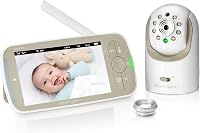
Can a Non-Wi-Fi Baby Monitor Connect to a Phone App?
Yes, some can, but only if the camera and parent unit are built for dual use. A non wifi baby monitor with phone app usually means a local screen for use at home and an optional app connection for viewing away from home.
On this page (9 sections)
- How does a non wifi baby monitor with phone app work?
- Why do parents want a local screen and a phone app together?
- Can Bluetooth connect a baby monitor to your phone?
- When does phone viewing need internet?
- What does the eufy Baby Monitor E21 do differently?
- What does the Momcozy BM04 offer for two rooms?
- How do you set up local viewing and phone viewing?
- What are the privacy and safety trade-offs?
- Which setup fits your home best?
Yes, some can, but only if the camera and parent unit are built for dual use. A non wifi baby monitor with phone app usually means a local screen for use at home and an optional app connection for viewing away from home.
That wording matters because "non Wi-Fi" often means the parent unit does not need internet, not that the camera can never use Wi-Fi. Some models keep a private local link for the screen, then add Wi-Fi only when you want phone viewing.
How does a non wifi baby monitor with phone app work?
It works through two separate paths: a local link and an optional internet link. The local link sends video straight from the camera to the parent unit.
The internet link sends the same feed through your router so your phone can show it from elsewhere.
Think of it like two doors to the same camera. The parent unit uses the local door, which stays open during a Wi-Fi outage.
The phone app uses the internet door, which needs home Wi-Fi or mobile data.
This differs from a Wi-Fi only camera, which sends every view through your router even in the next room. A dual-mode monitor keeps the screen view local, then adds phone access as a second option.
If you are still deciding between styles, our guide on how to choose a baby monitor breaks down screen, app, and hybrid models by daily use.
Why do parents want a local screen and a phone app together?
Parents want both because each view solves a different problem. The parent unit works fast at night, does not drain your phone, and keeps going if the internet drops.
The phone app helps at work, while traveling, or when sharing the view with family.
A dedicated screen also reduces phone alerts near the crib. You can keep your phone face down while the parent unit sits on the nightstand, which helps keep a calmer sleep space.
Phone viewing adds reach to check a nap from the kitchen, backyard, or another city. Some models also let grandparents watch, which can feel reassuring during a first visit or long trip.
The trade-off is setup. You pair the camera to the screen, then pair it again to Wi-Fi and the app.
That extra step is worth it only if you will use the app often.
Can Bluetooth connect a baby monitor to your phone?
Bluetooth alone is not enough for whole-house or remote baby monitoring. Bluetooth reaches about 30 feet in open space, and walls and doors can cut that range short.
Bluetooth is useful for setup tasks, such as finding a camera, starting pairing, or sending a short control signal nearby. It is not built for steady video streaming across a house.
A camera with only Bluetooth and a local screen will not show a live feed on your phone from work. For that, the camera needs Wi-Fi or another internet path through the app.
Check the specs for Wi-Fi and 2.4GHz wording before you assume "phone app" means remote viewing.
When does phone viewing need internet?
Phone viewing needs internet whenever you view from outside your home or from a network other than the camera's local link. The camera sends video to your router, then to an app server, then to your phone.
Your phone also needs a connection. At home that is usually Wi-Fi.
Away from home it is mobile data or public Wi-Fi. If either side loses service, the live feed pauses or drops.
This is why a dual-mode monitor can feel more dependable. The parent unit keeps showing the nursery during an outage.
Your phone may lose the feed, but the dedicated screen does not depend on the same path. For 2.4GHz systems, other devices on the same band may slow the stream, so a router near the camera helps.
What does the eufy Baby Monitor E21 do differently?
The eufy Baby Monitor E21 is built for hybrid monitoring: local screen at home and app viewing when you choose it. For its related model, see the eufy E20 baby monitor review. eufy says you can check in from anywhere at home, with or without Wi-Fi, and stay connected through the app while traveling.
Its camera gives you a 330° pan, 60° tilt, and 8x zoom for closer views. The 5,000mAh battery lets you move the camera between rooms or take it on a trip without hunting for an outlet.
Privacy controls are a key reason parents pick this model. A switch cuts off Wi-Fi for a private local connection.
That matters if you want phone viewing during the day, then local-only viewing at night.
The E21 also sends alerts for cries, loud noises, and room temperature changes. It records 24/7 in the app, and you can share access with up to 5 family members.
If you want that charging dock for the nightstand, see the matching eufy Security Baby Monitor Charging Base note in our review.
What does the Momcozy BM04 offer for two rooms?
The Momcozy BM04 Smart WiFi Baby Monitor with 2 Cameras suits parents who want two rooms on one screen plus app access. Read the full Momcozy BM04 baby monitor review for its features and setup details.
Its 5-inch split screen shows both feeds side by side, so you do not need to switch back and forth.
That layout helps with twins, siblings in separate rooms, or a nursery plus a play area. The system supports up to 4 camera connections, though this bundle includes 2 cameras.
Momcozy says you can use the non-WiFi parent unit for secure, real-time monitoring at home. For on-the-go viewing, the Momcozy App shows the live feed through Wi-Fi.
Wi-Fi pairing supports only 2.4GHz networks.
Night vision and two-way audio cover night use. Two-way audio lets you speak through the parent unit or your phone.
Momcozy also says up to 20 shared users can view, which suits grandparents who want to check in.
How do you set up local viewing and phone viewing?
Set up the local screen first, then add the app as a second step. That order keeps the nursery covered if Wi-Fi setup takes longer than expected.
It also lets you confirm camera angle and night vision before you leave the room.
Start by placing the camera at least 24 inches above the baby, as Momcozy advises for its BM04. Keep a wall or floor stand within 16 feet of the crib so infrared night vision can light the baby's face clearly.
Next, pair the camera to the parent unit and test the feed in daylight and at night. Check sound, motion alerts, and the viewing angle from the crib.
Then connect the camera to your 2.4GHz Wi-Fi network and sign in to the app.
Test the phone feed on both home Wi-Fi and mobile data. If the app will not pair, check the Wi-Fi band first.
Many cameras do not support 5GHz networks.
What are the privacy and safety trade-offs?
Dual-mode monitors add more connections to secure, but they also give you more control. A local-only link avoids internet exposure for the parent unit.
An app connection adds remote viewing, which means account security matters more.
Use strong, unique passwords for the app and your home Wi-Fi. Avoid reusing a password from other sites.
Turn on two-factor authentication if the app offers it, and remove old devices you no longer use.
The E21 gives you a physical way to limit exposure. Its switch cuts off Wi-Fi for local-only use.
That is a strong option for parents who want phone viewing only during travel or workdays.
Momcozy says the BM04 uses advanced encryption for app viewing. Encryption helps protect the feed, but it does not replace safe passwords or prompt updates.
Keep the app and camera firmware current, and review shared users from time to time. Mount cameras out of reach, keep cords away from the crib, and check the mount after any move.
Which setup fits your home best?
Pick a dual-mode monitor if you want a dependable screen plus optional phone reach. The local unit covers nights and outages.
The app covers workdays, travel, and family sharing.
Pick the E21 if you want one camera with pan, tilt, zoom, battery power, and a switch to cut Wi-Fi. Pick the BM04 if two rooms on one split screen matters more than a single moving camera.
Add a charging base if you want a neat nightstand dock for the E21.
If you want phone viewing all the time and do not need a parent unit, compare our best wifi baby monitor picks. If you want a screen plus Wi-Fi in one package, see the best wifi baby monitor with screen.
For VTech fans, check the best vtech wifi baby monitor, and for range, see the best long range baby monitor with wifi.
If your current screen goes dark or will not pair, start with why is my HelloBaby monitor not working before you buy a new system. For a closer E21 look, read the eufy baby monitor E21 review.
To weigh a screen-first rival, compare the Infant Optics DXR-8 vs DXR-8 Pro and decide whether you truly need phone viewing.
For any non wifi baby monitor with phone app, the rule is simple: local first for reliability, app second for reach. Test both paths before the first night, and keep the parent unit charged where you sleep.
Frequently asked questions
Can a non Wi-Fi baby monitor connect to a phone app?
Yes, if the model includes both a local parent unit and an optional app connection. The local screen works without your home Wi-Fi, while the phone app uses your Wi-Fi network or mobile data to show the feed when you are away from home.
Does my phone app work if home Wi-Fi goes out?
The parent unit keeps working locally during a Wi-Fi outage, but remote phone viewing stops until internet returns. That split is the main reason many parents choose a dual-mode monitor instead of a Wi-Fi only camera.
Is Bluetooth enough for baby monitor phone viewing?
Bluetooth only reaches short distances and is meant for setup or nearby control, not whole-house viewing. For another room or a trip away from home, you need Wi-Fi or another internet connection through the app.
Which product suits parents who want local and phone viewing?
The eufy Baby Monitor E21 suits parents who want a local screen plus optional app viewing with a switch to cut Wi-Fi. The Momcozy BM04 suits parents who want two cameras on one split screen with app access for shared viewing.