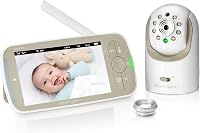
Infant Optics DXR-8 vs DXR-8 Pro: Which Should You Choose? (November 2026)
Choose the DXR-8 Pro for clearer HD video and Active Noise Reduction, and choose the original DXR-8 for a simpler 480p system at a lower tier. In an Infant Optics DXR-8 vs Pro choice, screen size, sound filtering and lens options decide which model fits your nursery.
On this page (12 sections)
- The quick verdict on the Infant Optics DXR-8 vs Pro
- The two monitors side by side
- Screen quality: 480p against 720p HD
- Sound quality and the LED volume light
- Privacy and the non-WiFi connection
- Lenses, pan tilt zoom and viewing angle
- Battery life and long term use
- Add-on cameras and power accessories
- Who should buy the original DXR-8?
- Who should buy the DXR-8 Pro?
- Safety checks and recalls to know about
- The final choice in the DXR-8 vs Pro
Choose the DXR-8 Pro for HD video and cleaner sound, and choose the original DXR-8 for a compact proven system. This infant optics dxr 8 vs pro comparison weighs screen quality, sound, lenses, battery use and add-on options against daily life in a nursery.
We compared the specs and features of both monitors and the accessories that work with them. We looked at what each model includes, how the camera connects and which extras you may need later.
Our score weighs specs, features and buyer feedback against what you're shopping for. Both main monitors score high because they work without WiFi, but they suit different rooms and viewing habits.
 Best for simple everyday monitoring
Infant Optics DXR-8 480p Video Baby Monitor

The quick verdict on the Infant Optics DXR-8 vs Pro
The Pro wins for picture and sound detail, while the original wins for compact size and simplicity. Pick the Pro if you watch from farther away or keep a fan running in the nursery.
Pick the original DXR-8 if you want a smaller handheld monitor and clear basic viewing. Its 480p image still shows movement and position well in most bedrooms and nurseries.
Neither model needs an app to start watching. Both connect the camera straight to the monitor, so you can check your baby without loading a phone app.
For a full walkthrough of the newer model, our infant optics dxr-8 pro review covers its daily controls and features in detail.
The two monitors side by side
The table shows the main gaps in one place: resolution, screen size, sound filtering and battery design. Use it as a starting point, then read the sections below for how each gap feels in daily use.
| Feature | Infant Optics DXR-8 480p | Infant Optics DXR-8 PRO |
|---|---|---|
| Video | 480p | 720p HD on 5 inch monitor |
| Connection | Non-WiFi FHSS | No WiFi, 2nd gen FHSS |
| Sound | LED sound bar | Active Noise Reduction |
| Camera control | Pan tilt zoom | Pan tilt zoom |
| Lenses | Interchangeable | Standard and zoom included |
| Night vision | Yes | Yes |
| Two-way talk | Yes | Yes |
The Pro feels like an update rather than a new system. It keeps the same direct connection idea, but adds HD video, a larger screen and noise filtering.
The original DXR-8 keeps a smaller monitor footprint. That can matter when you carry the screen from room to room or place it on a nightstand.
Screen quality: 480p against 720p HD
Choose the Pro if you often view from across the room or in low light. Its 720p HD image and 5 inch monitor show faces, bedding and small movements with more detail.
The original DXR-8 uses 480p video. That is enough to see whether your baby is asleep, awake or moving around the crib, but fine details look softer.
Night vision matters more than the number alone. Both models offer night vision, and the Pro is described as showing your baby in detail in total darkness.
Our guide to how to choose a baby monitor explains why screen size and placement matter as much as resolution. A larger screen helps when the monitor sits on a dresser rather than beside your bed.
What the size means at night
A 5 inch screen is easier to read at a glance in a dark room. You can check position and movement without leaning in or turning on a lamp.
The compact original monitor is lighter to hold and carry. If you move between the nursery, kitchen and bedroom, that smaller size can be a real benefit.
Think about where the monitor will live most nights. A bedside unit favors a larger screen, while a carried unit favors a smaller one.
Sound quality and the LED volume light
Choose the Pro if fans, purifiers or air conditioners make it hard to hear your baby. Its patented Active Noise Reduction filters constant background sounds so the feed focuses on your baby.
The original DXR-8 uses an LED sound bar. The light bars rise and fall with sound level, which helps when you keep the volume low at night.
That light can show you a cry or stir even if you do not hear it clearly. It is a simple visual cue that works without a phone alert.
If you own the Pro and see a blue light, our note on the infant optics dxr 8 pro volume led light blue helps you read that signal correctly.
Background noise in a real nursery
Many nurseries run a fan or air purifier all night. Those steady sounds can mask softer baby sounds on a basic audio feed.
Active Noise Reduction is designed for that exact problem. Infant Optics says it filters fans, air purifiers, heaters and air conditioners.
The original model does not offer that filtering. If your nursery is quiet, you may not miss it, but a noisy room can make the Pro sound clearer.
Privacy and the non-WiFi connection
Both models protect privacy the same way: no WiFi, no app and no cloud. The camera sends video and audio directly to the monitor through a private FHSS signal.
That means you do not need an account, a password or a router for the feed to work. It also means the feed does not pass through the internet.
For parents who want a dedicated monitor, our list of the best baby monitor no wifi options puts these models in that same no-app category.
Use how to choose a baby monitor as a checklist before you decide. It covers signal type, screen placement and the features you will use each night.
Why a dedicated monitor still helps
A phone app can make you wait for loading and notifications. A dedicated monitor opens instantly when you pick it up.
It also keeps your phone free for messages and daily tasks. You can leave the nursery monitor on without tying up your phone screen.
Both Infant Optics models use that approach. The difference is in resolution and sound filtering, not in the basic connection.
Lenses, pan tilt zoom and viewing angle
Both monitors let you pan, tilt and zoom from the monitor, and both use interchangeable lenses. That shared design is one reason the original DXR-8 has lasted through several years of use.
The original DXR-8 offers a zoom lens for a closer look and a wide-angle lens, sold separately, for a broader view. You can switch lenses to suit camera placement.
The DXR-8 PRO includes a standard lens and an optical zoom lens. Infant Optics says the zoom lens gives close-ups up to 6 times with digital enhancement.
Add the wide-angle lens, sold separately, when you want to see more of the room. That helps in larger nurseries or when the camera sits close to the crib.
Choosing the right lens for your room
Use the standard lens when the camera is across the room at a normal distance. It gives a balanced view of the crib and nearby floor space.
Use the zoom lens when the camera must sit farther away. It helps you see small details without moving the camera through the nursery door.
Use the wide-angle lens when the camera sits close to the crib or in a corner. It shows more of the room, but details look smaller.
The Pro can also show two rooms at once. Our explainer on infant optics dxr-8 pro split screen covers how that view works with add-on cameras.
Battery life and long term use
Choose the Pro if you want to replace a worn battery instead of replacing the monitor. Its user-replaceable battery is a practical change for families who keep a monitor for years.
The original DXR-8 is described as having long battery life. That helps with portability around the house, but battery replacement is not part of its listed design.
A replaceable battery changes the cost of keeping the same monitor through a second child. You can restore runtime in seconds without buying a new system.
Add-on cameras and power accessories
Check compatibility before you buy any add-on camera or power cord. The Pro add-on camera works only with the DXR-8 PRO, and the power adapter works only with camera units.
The DXR-8 PRO Add-on Camera adds a second room to one Pro monitor. It offers 720p video, pan tilt zoom, night vision and interchangeable lens support.
You can connect up to 4 cameras to one DXR-8 PRO monitor. Press the Camera button to switch feeds or use Scan Mode to rotate between rooms.
That camera will not work with the original DXR-8. Check the label on your parent monitor unit, since the Pro has a 5 inch screen and the original has a smaller screen.
The official power cord adapter fits both the DXR-8 and DXR-8 PRO camera units. It will not power the handheld monitor unit, which uses a different adapter.
Keep a spare camera adapter in mind if you move the camera between rooms. It is a small extra that can save a night of setup if a cord goes missing.
Who should buy the original DXR-8?
Buy the original DXR-8 if you want compact, proven monitoring without paying for HD or noise filtering. It suits smaller nurseries, quiet rooms and parents who carry the monitor often.
Its interchangeable lenses still give you control over the view. Pan, tilt and zoom let you check corners of the room without leaving your seat.
The LED sound bar is useful when you sleep with the volume low. You can see sound levels at a glance even in a dark bedroom.
Skip the original if you want the clearest night image or if background noise often covers baby sounds. In that case, the Pro is the better fit.
Who should buy the DXR-8 Pro?
Buy the DXR-8 Pro if you want HD detail, cleaner sound and a battery you can replace. It suits larger nurseries, noisy rooms and families who plan to add rooms later.
Its larger screen makes night checks easier from a bed or dresser. You can see bedding, position and movement with more detail than on 480p.
Active Noise Reduction helps in rooms with fans or air conditioners. That can reduce false alarms from steady background sounds.
Skip the Pro only if size matters more than detail. The original monitor is more compact to carry, and it still offers the core non-WiFi design.
Safety checks and recalls to know about
Before you buy any monitor, check that the model is not subject to a recall check. A quick lookup protects your baby and saves you trouble after a purchase.
If you compare other brands, our guide on the babysense baby monitor recall shows how to check a monitor model before you use it.
For Infant Optics models, confirm the exact monitor name on the label. DXR-8 and DXR-8 PRO look similar, but their add-on cameras are not interchangeable.
If a monitor stops pairing or the screen stays dark, start with power and pairing steps. Our troubleshooting guide for hello baby monitor not working covers general checks that can help you rule out simple causes.
The final choice in the DXR-8 vs Pro
Pick the DXR-8 Pro for HD video, Active Noise Reduction and a replaceable battery, and pick the original DXR-8 for a compact 480p system. This infant optics dxr 8 vs pro decision comes down to how far you view from and how noisy your nursery is.
If you watch from bed, use a fan or plan a second room, the Pro gives you more for daily use. If you carry the monitor around the house and want a smaller screen, the original still covers the basics well.
Use the add-on camera note as your last check. The Pro add-on camera is Pro only, so match it to the 5 inch monitor before you order.
For the full picture on the newer model, read our infant optics dxr-8 pro review next.
Frequently asked questions
Is the DXR-8 Pro better than the DXR-8?
The DXR-8 Pro is better for screen detail and sound filtering. It offers 720p HD video on a 5 inch monitor and Active Noise Reduction, while the original DXR-8 offers 480p video on a more compact monitor.
Both use non-WiFi FHSS connections with pan, tilt and zoom.
Can I use a DXR-8 Pro add-on camera with the original DXR-8?
No. The DXR-8 PRO Add-on Camera pairs only with the DXR-8 PRO 5 inch monitor.
It will not work with the original DXR-8 3.5 inch model.
Check the label on your parent monitor unit before you order an add-on camera.
Do either monitor need WiFi or an app?
No. Both the DXR-8 and the DXR-8 PRO use a direct FHSS connection between camera and monitor.
Video and audio do not pass through the internet, so you can view your baby without opening an app on your phone.
Which lens should I use for a nursery?
Use the standard lens for most rooms and the zoom lens when you want a closer view from across the nursery. Add the wide-angle lens, sold separately, when you need to see more of the room at once.
Both models support interchangeable lenses.
What happens when the monitor battery wears out?
The DXR-8 PRO has a user-replaceable battery, so you can restore runtime without replacing the monitor. The original DXR-8 is described as having long battery life, but the Pro model makes battery replacement part of the everyday design.