Infant Optics DXR-8 Pro Baby Monitor Review: Worth It? (November 2026)
The Infant Optics DXR-8 Pro suits parents who want a private, no-WiFi monitor with a 5-inch HD screen, pan, tilt and zoom, and patented Active Noise Reduction. It is a strong choice if you value a direct parent unit over an app, and you plan to replace the battery instead of replacing the whole monitor.
On this page (10 sections)
- The Infant Optics DXR-8 Pro at a glance
- Picture quality and night vision in daily use
- Active Noise Reduction and sound quality
- No WiFi, no app: the privacy trade-off
- Interchangeable lenses and camera movement
- Setup, pairing and everyday care
- Add-on cameras and multi-room viewing
- Trade-offs and honest limits
- How it compares with similar monitors
- Final verdict on this infant optics dxr-8 pro review
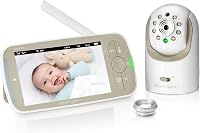
The Infant Optics DXR-8 Pro is a private, app-free monitor with a 5-inch HD screen and 720p video. This infant optics dxr-8 pro review looks at its picture quality, patented Active Noise Reduction, interchangeable lenses, add-on camera options and replaceable battery.
It fits best if you want a dedicated parent unit on your nightstand rather than a phone app.
You get one camera, one monitor and two lenses in the main kit. The standard lens covers most rooms, and the zoom lens gives a closer view when your baby is farther from the camera.
A wide-angle lens is sold separately if you want a fuller room view.
Our score weighs specs, features and buyer feedback against what you are shopping for. We have not tested this monitor firsthand, and the details below come from Infant Optics and product specifications.
The Infant Optics DXR-8 Pro at a glance
The DXR-8 Pro is a no-WiFi monitor with a direct camera-to-screen link. That single choice shapes the whole experience, from privacy to the lack of phone viewing.
Infant Optics DXR-8 PRO: Best for private no-WiFi monitoring

- 5-inch HD video monitor with 1 camera
- No WiFi, app-free direct FHSS connection
- Patented Active Noise Reduction
- Pan, tilt and zoom with night vision
- Interchangeable standard and zoom lenses
A dedicated monitor for parents who want to see and hear their baby without an app or cloud account. The main draw is the private direct signal, clear night view and lenses you can swap for a closer look.
Pros
- No WiFi, app, account or cloud needed
- Active Noise Reduction filters fans and HVAC sounds
- Interchangeable lenses for standard and zoom views
- User-replaceable battery keeps the monitor in service
- Pan, tilt and zoom from the parent unit
Cons
- No app or remote viewing away from home
- Wide-angle lens is sold separately
- 720p is HD for a monitor but not higher than some rivals
The kit includes a camera unit with an aluminum lens hood, a monitor with a rechargeable lithium-ion battery, a charging cable, a power adapter, mounting screws and an anchor, an optical zoom lens, and a manual. The monitor measures 4 x 6 x 3 inches and weighs about 0.9 kg for the full item.
The dome form factor helps with movement, since the camera can pan and tilt from the parent unit rather than needing a hand on the housing. The control method is remote push button, which keeps the nursery camera untouched when your baby is asleep.
The specified alert type is motion only, so sound and image are the focus rather than app notifications.
Who the DXR-8 Pro suits best
Buy it if you want a screen that stays in your room and works without your home network. Parents who travel, use grandparents' homes or distrust app-based cameras often prefer this setup.
The parent unit also works during a power cut to your router, since the signal does not pass through the internet.
Skip it if you need to check on your baby from work or from another home. There is no app, account or cloud feed to open on your phone.
Picture quality and night vision in daily use
The DXR-8 Pro gives 720p HD video on a 5-inch screen, which is sharp enough to spot small movements and a pacifier. The camera uses a high definition CMOS lens, and the zoom lens adds optical zoom up to 6x with digital enhancement for close views.
Night vision uses an LED light source, so you can see your baby in total darkness without turning on the nursery light. From your bed, you can press a button to pan, tilt or zoom the camera.
That matters when your baby rolls to a corner of the crib and the fixed view would miss it.
Daytime color is also part of the picture, since the same CMOS lens carries the 720p feed in a lit room. A larger 5-inch screen than the original 3.5-inch model makes it easier to check on a baby at arm's length.
That size still fits a nightstand, which is where most parents keep a dedicated monitor.
Resolution is 720p rather than a higher number. That is a fair trade for a battery-powered parent unit, but it is worth knowing if you compare it with a plug-in camera that streams to a large phone screen.
Active Noise Reduction and sound quality
Active Noise Reduction, or ANR, is patented technology that filters fans, purifiers, heaters and air conditioners. Infant Optics says the system leaves baby sounds clearer and cuts static, so fewer background noises trigger false worry at night.
The practical gain is sleep. A fan on high can mask a soft cry, and a purifier can fill a room with hiss.
By filtering steady sounds, ANR helps you hear the sounds that matter. It does not remove every noise, and it will not make a baby cry quieter, but it targets the constant sounds that bother parents most.
The camera also has a remote thermometer, so you can check room temperature from the parent unit. That helps you decide whether to add a layer or open a window before you walk into the nursery.
A thermometer reading on the screen is a small detail that saves a full trip to the door in many night wake-ups.
No WiFi, no app: the privacy trade-off
The DXR-8 Pro uses 2nd gen FHSS technology for a direct private signal. The camera connects straight to the monitor without a router, app, account or cloud, so the video does not travel over the internet.
That design answers a common worry about hackers. A WiFi camera can be exposed through an app account, a weak password or a router flaw.
This monitor has no such path, since it never joins your home network.
The trade-off is real. You cannot get a push alert on your phone, save clips to the cloud or view the nursery from another city.
If that flexibility matters more than privacy, our guide on how to choose a baby monitor will help you weigh the two styles.
Interchangeable lenses and camera movement
The DXR-8 Pro is the only monitor in this group that lets you swap lenses in seconds. The kit includes a standard lens for most rooms and an optical zoom lens for close detail.
You can add a wide-angle lens, sold separately, for a full-room view.
Lens choice changes what you see. A standard lens suits a crib near the camera.
A zoom lens helps when the crib sits across a large nursery or when you want to read facial detail. A wide-angle lens reduces blind spots in a room with a crib, dresser and door in different corners.
Pan, tilt and zoom work from the parent unit on every camera. That movement plus a lens swap gives you more control than a fixed camera, at the cost of learning which lens you prefer for each room.
Setup, pairing and everyday care
Setup is plug in, power on and watch, with no app, account, subscription or software update. Infant Optics describes it as unbox, plug in and ready.
For most homes, that means the monitor works within minutes of opening the box.
Place the camera where it can see the crib without a direct view of a window or bright lamp. Use the included mounting screws and anchor if you want it on a wall or shelf, and keep cords out of reach of your baby.
Charge the parent unit before first use and keep the power adapter handy for overnight use.
To add a camera, go to Menu, then Camera Control, then Add Camera on the monitor. Hold the Pair button on the new camera until the light flashes.
Infant Optics says pairing takes about a minute.
Keeping the battery healthy for daily use
The monitor runs on a rechargeable lithium-ion battery, so portability depends on keeping that cell charged before you move it between rooms. A genuine replacement battery is 3000 mAh and swaps in about 30 seconds without tools.
That design means a fading battery is a spare part issue, not a reason to discard the whole monitor.
When you replace the battery, slide off the cover on the back of the monitor and unplug the old connector before plugging in the new one. Genuine parts include overcharge, over-discharge and short-circuit safeguards, and they keep the warranty compliant.
Check that the model is DXR-8 PRO or PRO SS before ordering, since the battery will not fit the original DXR-8.
Care is simple. Wipe the screen and lens with a soft, dry cloth.
Keep the camera away from water and dust, and check the battery charge before you rely on the monitor for a full night.
Add-on cameras and multi-room viewing
One DXR-8 Pro parent unit can connect up to 4 cameras in total. You can switch feeds with the Camera button or use Scan Mode to rotate between rooms automatically.
That makes this system easy to grow from a nursery to a toddler room or a grandparent's home.
The add-on camera has the same core features as the kit camera. It offers 720p HD, night vision, remote pan, tilt and zoom, a room thermometer, interchangeable lens support, a wall mount and a power adapter.
The add-on camera and battery alternatives
Before you add a camera, confirm your model label. This next option is only for the DXR-8 Pro, not the original DXR-8.
If your battery no longer holds a charge, a genuine spare is the cheaper fix. This option fits the DXR-8 Pro and the PRO SS model only.
Our post on which Infant Optics camera works with your monitor clears up the compatibility issue in more detail.
Trade-offs and honest limits
The DXR-8 Pro trades phone access for privacy and simplicity. That is a clear win if you sleep in the same home and want a dedicated screen.
It is a clear loss if you want alerts, recordings or remote viewing.
The wide-angle lens costs extra, and the battery will fade after a few years even though you can replace it. The 720p resolution is good for a 5-inch monitor but not the highest available.
The system is indoor use, so it is not a camera for a porch or a yard.
Weight is another point to note. At about 0.9 kg for the item, it is portable between rooms, but you will want a stable shelf or mount rather than holding it in one hand each night.
The white finish and dome shape suit a nursery, and the included aluminum lens hood protects the lens when the camera sits low near a crib.
If you want a no-WiFi option with fewer extras, our list of the best baby monitor no wifi gives you other models to compare.
How it compares with similar monitors
The DXR-8 Pro stands apart with ANR, interchangeable lenses and a replaceable battery. Most rivals offer one or none of those features.
A VTech model may suit you better if you want a lower price or a different screen size, so compare our best VTech baby monitor picks before you decide.
If you already own the standard DXR-8, the Pro is an upgrade rather than a simple add-on. The cameras and batteries are not interchangeable between the two systems.
Our side-by-side on the Infant Optics DXR-8 vs DXR-8 Pro breaks down what changes.
You may also wonder about split-screen viewing with more than one camera. Our guide on the Infant Optics DXR-8 Pro split screen explains how the Pro handles more than one feed.
If you run into trouble with another brand, our help post on why a HelloBaby monitor is not working covers common causes.
Final verdict on this infant optics dxr-8 pro review
Pick the Infant Optics DXR-8 Pro if privacy, clear sound and a replaceable battery top your list. It is a thoughtful choice for a nursery where you want a parent unit that just works, night after night, without an app or a home network.
Pick an add-on camera if you want to watch a second room from one screen. Pick a spare battery when your current one fades, and check the model label first.
Pick a WiFi or app-based monitor instead if remote viewing matters more than a private direct link. For a different brand to compare, see our eufy baby monitor E21 review or the related posts above.
Frequently asked questions
Is the Infant Optics DXR-8 Pro a WiFi monitor?
No. The DXR-8 Pro uses a direct 2nd gen FHSS signal between the camera and the parent unit, with no WiFi, app, account or cloud.
That keeps the link private and local, but it also means you cannot view the feed from your phone while you are away from home.
What does Active Noise Reduction do?
Patented Active Noise Reduction filters steady background sounds such as fans, air purifiers, heaters and air conditioners. Infant Optics says the goal is to leave baby sounds clearer and reduce static, so you hear cries and movement more than room noise.
Can I use a DXR-8 Pro add-on camera with the original DXR-8?
No. The add-on camera is only compatible with the DXR-8 Pro 5-inch monitor and will not work with the original DXR-8 3.5-inch model.
Check the label on your parent unit before buying, since the cameras look similar but the systems are not interchangeable.
What happens when the DXR-8 Pro battery wears out?
The battery is user-replaceable, so you can swap in a genuine Infant Optics battery without tools. Infant Optics says the swap takes about 30 seconds.
That costs less than a new monitor and keeps a working unit in service for a newer baby.