Can You Use a Nanit Baby Monitor Screen?
Nanit does not sell a separate handheld screen for its cameras, so a Nanit baby monitor screen means using a phone, tablet, or computer instead. You can still get a dedicated viewing device by adding a second, non-WiFi monitor for audio or video.
On this page (9 sections)
- Does Nanit have a handheld monitor?
- Why does Nanit use a phone app instead of a screen?
- Can you view a Nanit on a PC or tablet?
- What should you check before buying a Nanit screen setup?
- What if you want a real dedicated screen instead?
- Which products help if a phone screen is not enough?
- How do you secure a phone or tablet used as a monitor?
- When should you choose a spare tablet over a second monitor?
- Is a Nanit baby monitor screen the right move for your home?
Nanit does not sell a separate handheld screen for its cameras, so a Nanit baby monitor screen means using a phone, tablet, or computer instead. You can still get a dedicated viewing device by adding a second, non-WiFi monitor for audio or video.
That answer matters because many parents shop for a Nanit expecting a parent unit in the box. Nanit is built around an app view, so the screen question is less about buying an accessory and more about choosing the device you will watch most.
Does Nanit have a handheld monitor?
No, Nanit does not offer a handheld monitor that pairs with its cameras. The camera sends video and audio to the Nanit app on a phone or tablet, and that app is the main screen.
If you want a fixed viewing station, a spare phone or tablet can fill that role. It can stay in the living room or bedroom, plugged in, with the Nanit app open.
Our guide to how to choose a baby monitor helps you compare app-based systems with dedicated-screen systems. It is useful if a handheld unit would fit your routine better.
Why does Nanit use a phone app instead of a screen?
Nanit uses a phone app because the camera works over WiFi and the app adds features a basic screen cannot match. Those features include movement and sound alerts, sleep tracking, and saved clips in some plans.
A dedicated screen, by contrast, usually shows live video and plays sound with fewer menus. It can be simpler at night, but it does not add tracking or history on its own.
The trade-off is screen fatigue. A phone view is rich, but it asks you to keep a device charged, updated, and connected.
Is a spare phone a good Nanit baby monitor screen?
A spare phone is a good Nanit screen if you already own one and want a second view without buying new hardware. It works best when the phone is not your main phone, so calls and messages do not pull you away from the nursery feed.
Set it up on a nightstand or desk, plug it in, and turn off notifications. Test the view, sound level, and alert settings before the first night.
Keep the phone's screen brightness low enough for sleep, but high enough to read at a glance. That small adjustment can make a spare device feel close to a dedicated monitor.
Can you view a Nanit on a PC or tablet?
Yes, you can view a Nanit on many larger screens, and a tablet often feels more like a monitor than a phone. A computer can also work well for a desk-based view during the day.
The key is setup. The viewing device needs the Nanit app or browser access, the right login, and a steady WiFi connection.
A weak signal in the nursery or the viewing room will affect any screen you choose.
For step-by-step setup, see Nanit baby monitor on the PC. It covers the practical choices for someone who wants a bigger display than a phone.
A tablet on a stand is often the sweet spot. It is large enough to see the crib clearly, portable enough to move between rooms, and easy to keep plugged in.
What should you check before buying a Nanit screen setup?
Check the viewing device first, not the camera. The screen size, battery life, WiFi strength, and mounting position will shape your daily experience as much as the camera feed.
A phone with a bright screen and low battery can become a nightly chore. A tablet with a stable charge and a good stand can feel calm and reliable.
Also check your home WiFi in both rooms. The nursery needs a strong signal for the camera, and the room where you watch needs a strong signal for the screen.
How do you mount a phone or tablet for nighttime viewing?
Mount the screen where you can see it without picking it up. A nightstand stand, a wall mount, or a desk stand keeps the feed in one place.
For a Nanit camera itself, placement matters too. Our guide to the best baby monitor mount can help you place the camera for a clear crib view.
Keep cords away from the crib and out of walkways. Tape or route them along a wall, and leave enough slack that the stand cannot pull the device down.
What if you want a real dedicated screen instead?
If you want a true dedicated screen, add a second monitor that comes with its own parent unit. That monitor will not show the Nanit feed, but it can give you simple audio or video in the room where you sleep or spend time.
This choice suits parents who like Nanit's tracking during the day but want a low-tech backup at night. It also suits grandparents, travel, or a second nursery where an app may be too much.
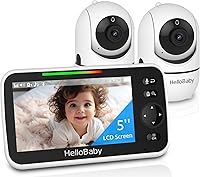
The HelloBaby HB6550 is one such option, with a 5-inch color screen, pan and tilt, night vision, and two-way audio. It works without WiFi, so the screen and camera pair directly.
That monitor does not replace Nanit insights. It gives you a separate, always-on view that does not depend on your home network or phone battery.
Which products help if a phone screen is not enough?
Three product types help in different ways. A floor stand improves Nanit camera placement, a non-WiFi video monitor adds a dedicated screen, and an audio monitor adds simple sound with a belt clip.
The Didalo Floor Stand fits Nanit Pro, Nanit Plus, and Nanit Original cameras, with height adjustable from 37.4 to 68.8 inches. It has a heavy base, a gooseneck arm, and a swivel holder, and the camera is not included.
That stand helps your Nanit screen show a better angle. It does not add a screen, but it can reduce looseness and make the view easier to adjust as your baby grows.
Who is the VTech DM111 best for as a backup?
The VTech DM111 suits parents who mainly need sound, not video. It is an audio-only monitor with DECT 6.0, no WiFi, an 8-hour battery, a belt clip, and a 1,000-foot range.
It has a 5-level sound indicator, so you can mute the speaker and still see how loud the nursery is. That feature helps in a bedroom where a full video feed may feel too bright.
It also suits grandparents or travel, because setup is automatic with no app, account, or pairing screens. The trade-off is clear: you hear your baby, but you cannot see them.
How do you secure a phone or tablet used as a monitor?
A phone or tablet used as a screen needs basic security, just like any device that stays logged in. Use a strong passcode, keep the app updated, and avoid using a shared or unsecured device.
Turn off lock-screen notifications that could show private details. Keep the device in the nursery viewing area, not in a public space.
For a broader checklist, see baby monitor with phone and monitor security. It explains safer logins, app permissions, and device placement.
Also avoid guest WiFi for the nursery camera when possible. A stable home network, a strong password, and updated firmware give the feed a better chance to stay private and reliable.
When should you choose a spare tablet over a second monitor?
Choose a spare tablet if you want the Nanit feed on a larger screen and you already have a device to spare. It keeps alerts, tracking, and history in one app.
Choose a second monitor if you want simple audio or video that does not depend on WiFi, a phone battery, or an app login. That choice often wins for overnight peace of mind.
For Nanit-specific context, read our Nanit Pro baby monitor review. It helps you weigh the camera's features before deciding what screen to add.
If you still want a Nanit-only setup, check what comes with the Nanit Pro complete monitoring system. It clarifies what is in the box and what you must supply yourself.
Is a Nanit baby monitor screen the right move for your home?
A Nanit baby monitor screen is the right move when a spare phone or tablet can stay plugged in, updated, and in a fixed spot. It is less right when your only screen is your main phone.
If you need a dedicated parent unit, add a separate monitor rather than waiting for a Nanit handheld unit. That gives you a simple screen now, while Nanit still handles app-based tracking.
Pick the spare tablet for a bigger Nanit view, pick the HelloBaby for a non-WiFi video screen, and pick the VTech for quiet audio with a belt clip. For more on whether Nanit offers a handheld option, see does Nanit have a handheld monitor.
Frequently asked questions
Does Nanit have a handheld monitor?
No. Nanit cameras stream to a phone or tablet through its app, and Nanit does not offer a separate handheld parent unit.
If you want a dedicated screen, you can use an older phone or tablet as a Nanit viewer, or add a separate monitor with its own screen for backup audio or video.
Can I use a tablet as a Nanit screen?
Yes, a tablet can run the Nanit app and act as a dedicated viewer when it is logged in and connected to the same home network. Keep it plugged in, set it to stay awake, and place it where you want to watch.
Check the app setup for that device before relying on it at night.
Is a phone safe to use as a baby monitor screen?
A phone can work for short-term viewing, but it is not built as a dedicated nursery monitor. Calls, notifications, low battery, and app updates can interrupt the view.
A spare device on a charger, used only for monitoring, is a safer setup than your main phone.
What is the best alternative to a Nanit screen?
The best alternative depends on what you miss most. Use a spare phone or tablet for a larger Nanit view, a computer for a desk view, or a separate monitor with its own screen for simple audio or video without WiFi.
Pick based on range, night audio, and how often you check the feed.