What Is in the Nanit Pro Complete System Box?
The Nanit Pro complete baby monitoring system centers on the Nanit Pro camera and its included mounting hardware for placing the camera in the nursery. You view the feed through the Nanit app on your phone, not a dedicated handheld screen. Add a floor stand, a second no-WiFi monitor, or an audio-only unit if you want more placement choices or a backup.
On this page (9 sections)
- What does the Nanit Pro complete system include in the box?
- How do you view the Nanit Pro feed without a handheld screen?
- What mounting options work with the Nanit Pro camera?
- Can a floor stand replace the included Nanit mount?
- What add-ons help if you prefer a dedicated screen?
- What backup monitor helps when WiFi or the app fails?
- How should you set up the Nanit Pro bundle for the first night?
- How do you care for the Nanit Pro and its mounts?
- Is the Nanit Pro complete system right for your nursery?
The Nanit Pro complete baby monitoring system is built around one camera and phone viewing through the app. That app-first design is the main thing to plan around before you buy.
It changes where you place the camera, how you check the nursery at night, and what backup you may want.
If you have not yet read our guide on how to choose a baby monitor, start there for the trade-offs between WiFi video, no-WiFi video and audio-only monitors. This post focuses on the Nanit Pro bundle itself, its mounting choices, and the add-ons that solve common gaps.
What does the Nanit Pro complete system include in the box?
The Nanit Pro complete system is a camera-focused bundle, not a handheld-screen kit. Expect the Nanit Pro camera and the mounting hardware Nanit supplies for that bundle, and confirm the exact pieces in your retailer pack before you open it.
Contents can vary by seller and region, so the box you receive is the source to trust.
It does not always include a floor stand or other optional mounts. If floor placement matters, plan to buy that mount separately.
The camera works with the Nanit app for live viewing. Our Nanit Pro Baby Monitor Review covers picture, sound and app features in more detail.
How do you view the Nanit Pro feed without a handheld screen?
You view the Nanit Pro feed on a phone or tablet through the Nanit app. There is no included handheld parent unit in this design.
Your phone becomes the screen.
Viewing depends on WiFi in the nursery and on your phone connection. To check from a laptop, read how to view a Nanit baby monitor on the pc, which is a workaround rather than a replacement for the app.
Some parents prefer a dedicated screen that stays on a dresser all night. See whether you can use a separate screen with Nanit for the available options and limits.
A separate no-WiFi video monitor can cover a second room or serve as that always-on screen, as we look at later.
What mounting options work with the Nanit Pro camera?
Mounting choice is often the real decision in this bundle. Wall placement gives a fixed high view, while a floor stand gives height and position flexibility without drilling.
A wall mount suits a nursery where you can fix the camera above the crib and keep the cable tidy. It keeps the floor clear, which helps in a small room, though moving it later can leave marks.
A floor stand suits renters and parents who reposition the camera as the crib moves. It takes floor space, and the stand must fit your camera model exactly.
Can a floor stand replace the included Nanit mount?
Yes, a compatible floor stand can replace the wall mount for everyday placement. The Didalo stand snaps to Nanit Pro, Nanit Plus and Nanit Original cameras, and the camera is not included.
You move your existing Nanit camera onto this stand.
The stand adjusts from 37.4 in to 68.8 in high. Set it just above the crib for a close view or higher for a wider view, then use the gooseneck arm to angle the camera.
Its heavy-duty circular base is made of solid iron for stability. Didalo says the design addresses looseness and detachment between the Nanit camera and its original mount.
This stand suits parents who rent, move the crib often, or lack a good wall spot above the crib. It suits you less if floor space is very tight or if you want the camera fixed high on the wall.
Check that your camera snaps in fully before you rely on it over the crib.
Where should you place a floor stand in the nursery?
Place the stand where the base sits flat and the camera looks straight into the crib. A straight-on view shows more of the crib than a side view.
Keep it close enough that bedding and rails do not block the lens. Secure the power cable along the stand or wall so a toddler cannot pull it into the crib.
Test the view from your phone before fixing the height. Adjust in small steps and recheck the angle until the crib fills the frame.
What add-ons help if you prefer a dedicated screen?
A dedicated screen helps if you want an always-on display that is not your phone. A no-WiFi video monitor with its own screen covers that need in a way the Nanit Pro does not.
It can also serve as a second room monitor.
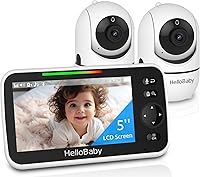
The HelloBaby HB6550 has a 5 in color display and a camera that pans 355° horizontally and 120° vertically. It includes 2x zoom, infrared night vision and 2-way audio, with the camera needing a plug and the screen unit helped by a 30-hour battery average life.
It uses 2.4GHz FHSS with digital encryption and no WiFi. The camera and screen link directly with no app and no account, so it still works if home WiFi drops.
This monitor suits parents who want a second screen, a travel monitor, or a simpler backup for grandparents. It suits you less if you want Nanit app history or phone viewing for every room.
You would run two systems, so decide which one is primary.
How do you choose between running one system or two?
Run one system if one nursery view covers your daily routine. Add a second system only when a room, screen or backup need is real.
Two systems cost more and need two power points, two charging habits and two sets of controls.
A second system makes sense for a second child, a grandparent's home, or a parent who wants a dedicated screen at night. It makes less sense if it only duplicates what your phone already shows.
Be honest about whether you will use the extra screen every night.
If a handheld Nanit screen is your main question, read does Nanit have a handheld monitor. That post explains the gap directly, so you can decide before you order mounts or a second monitor.
What backup monitor helps when WiFi or the app fails?
An audio-only monitor is a simple backup when the Nanit feed is unavailable. It needs no WiFi, no app and no account, so it works when the main system does not.
The VTech DM111 uses DECT 6.0 digital transmission with an encrypted channel between baby and parent units, with no internet link. Its parent unit has an 8-hour rechargeable battery, plus included AAA batteries as backup.
The parent unit clips to a belt or pocket and reaches 1,000 ft. A 5-level LED indicator shows nursery sound even when muted, and setup links the units in about 60 seconds.
This monitor suits parents who want a backup, a travel unit or a simple monitor for grandparents. It suits you less if you need video or night vision on the backup.
As a backup, audio may be enough because its job is to alert you.
How should you set up the Nanit Pro bundle for the first night?
Set up the camera, mount and app before the first night if you can. Test the view, sound and night view in daylight first.
Mount the camera so the crib fills the frame and the lens stays clear of walls, shelves and rails. Tighten a floor stand and check for drift, or confirm the wall mount is fixed and its cable secured.
Connect power and open the app. Check the live feed, clear sound and readable night view.
Keep a simple backup within reach for the first week while you confirm nursery WiFi is strong enough.
How do you care for the Nanit Pro and its mounts?
Care for the camera with simple, regular checks. Wipe the lens with a soft dry cloth and check the mount and cable weekly.
Dust on the lens softens the night view, and a loose mount changes the angle you set up.
For a floor stand, check the base, poles and gooseneck for tightness. The Didalo stand uses a heavy base and metal poles, but any stand can loosen after bumps.
Tighten connections before the camera is over the crib, and recheck after moves or cleaning.
For any monitor, store batteries and chargers where toddlers cannot reach them. Follow the maker instructions for charging and for the included AAA backup batteries in the VTech unit.
Replace a damaged cable or charger instead of using it with a baby monitor.
Is the Nanit Pro complete system right for your nursery?
The Nanit Pro complete baby monitoring system suits you if you want a camera-first system and are happy to view through your phone. Pick a floor stand if you rent or move the crib, and a wall mount if you want a fixed high view.
Add a dedicated screen or audio backup only for a clear second need. Pick the Didalo floor stand for placement without wall damage.
Pick the HelloBaby HB6550 if a no-WiFi 5 in screen matters more than app viewing. Pick the VTech DM111 for a simple audio backup for travel, grandparents or WiFi outages.
For a final check, read our guide on how to choose a baby monitor and compare the Nanit Pro with the Nanit Pro Baby Monitor Review.
Frequently asked questions
Does the Nanit Pro complete baby monitoring system include a handheld screen?
No. The Nanit Pro system is designed around phone viewing through the app, not a separate handheld monitor.
If you want a dedicated screen in another room, pair the Nanit with a no-WiFi video monitor for that room or check our guide on a nanit baby monitor screen before you buy.
Can I use a floor stand instead of a wall mount for a Nanit Pro?
Yes, if the stand is made for the Nanit Pro camera. The Didalo floor stand snaps to Nanit Pro, Nanit Plus and Nanit Original cameras and adjusts from 37.4 in to 68.8 in high.
Camera is not included, so you move your existing camera onto it.
What is a good backup monitor if my Nanit is offline?
A simple audio monitor is a practical backup because it needs no WiFi and no app. The VTech DM111 uses DECT 6.0, runs about 8 hours on its rechargeable battery, and reaches 1,000 ft.
It tells you sound level with 5 LED lights even when muted.