Why Is My HelloBaby Monitor Not Working?
If your HelloBaby monitor is not working, check power, charge, pairing, and distance first. Most hello baby monitor not working cases come from a low battery, a loose charger, cameras out of range, or units that need to be re-linked.
On this page (9 sections)
- What should you check first when a HelloBaby monitor stops working?
- Why does my HelloBaby monitor have no power?
- How do you fix a HelloBaby monitor with no signal?
- Why is there sound but no picture, or picture but no sound?
- How do you reset and re-pair a HelloBaby monitor?
- Why does the picture freeze, blur, or show static?
- What about chargers, batteries, and replacement parts?
- When should you replace the monitor instead of fixing it?
- How do you prevent the same problem from happening again?
If your HelloBaby monitor is not working, check power, charge, pairing, and distance first. Most hello baby monitor not working cases come from a low battery, a loose charger, cameras out of range, or units that need to be re-linked.
Start with the simplest tests. Turn on both the camera and the screen, plug in the camera, and put the screen on charge.
If sound or picture returns, you have found the cause and can work from there.
What should you check first when a HelloBaby monitor stops working?
Power on both units, a charged screen, and a firmly plugged camera fix the most common failures. Do this before you reset anything or move furniture.
Confirm the camera power light is on. HelloBaby video cameras are plug-in units, so a tripped outlet or a loose adapter will stop the feed even when the screen still shows a menu.
Put the screen on its charger and give it time to charge. A screen that turns on for a few seconds and then dies is usually a battery issue, not a broken camera.
If you are unsure whether your model is the right fit for your nursery, our guide on how to choose a baby monitor explains the main types and features to compare.
Why does my HelloBaby monitor have no power?
A dead battery or a bad charger is the top cause of no power. The screen may light up briefly, show a low battery icon, or not turn on at all.
Try a different outlet and the charger that came with your model. If the screen charges with one adapter and not another, the adapter or cable may be worn.
For a screen that will not hold a charge, compare options in our guide to the best hello baby monitor charger. Check the connector shape and voltage in your manual before you buy a spare.
Do not leave a screen on charge for days if it already shows a full battery. Unplug it once charged, and store chargers where cords will not be bent or pulled.
How do you fix a HelloBaby monitor with no signal?
Move the screen closer to the camera and re-pair the units when you see a no signal or out of range message. Distance and walls are the usual cause.
Bring the screen into the nursery and test it there. If the picture returns, range is your problem, and you can test longer distances room by room.
Walls, floors, metal doors, and large appliances can reduce range. A claimed outdoor range does not promise the same reach through two floors of a house.
If re-pairing does not help, check that the screen is set to the correct camera. Multi-camera setups can show the wrong feed or no feed if the channel is set incorrectly.
For a dark picture, see our guide to a hello baby monitor black screen.
Why is there sound but no picture, or picture but no sound?
Separate the audio path from the video path before you reset the whole system. Each fault points to a different setting or part.
If you hear your baby but see no picture, check brightness, audio-only mode, and power-saving mode. Some screens turn off video to save battery while audio continues.
If you see your baby but hear nothing, check volume, mute, and sound sensitivity. A muted screen can look normal while it plays no audio.
Test the microphone and speaker at close range. Quiet room tone from both units shows the link is live.
If the issue began after a move, re-pair in the same room. That removes range as a cause.
How do you reset and re-pair a HelloBaby monitor?
Unplug both units, wait one minute, plug them in, and pair them again in the same room. This clears temporary link faults without changing settings.
Turn off the screen and camera. Unplug the camera adapter and remove the screen from its charger.
Wait one minute so both units fully power down. Plug in the camera first, then turn on the screen nearby.
Follow the pairing steps for your exact model. Menus differ by model, so use the manual or the on-screen prompts rather than steps for another HelloBaby line.
If you need to know which models are current, our roundup of the best hello baby monitor compares screen size, camera count, and features.
What if a factory reset does not fix the problem?
A factory reset only helps when settings or pairing are corrupted. It will not fix a worn charger, a failed battery, or a broken camera.
Do a factory reset only after power, charge, and close-range pairing tests fail. Note any custom settings first, since a reset can clear them.
If the problem returns right after pairing, test with a spare charger if you have one. That test separates a power fault from a link fault.
How do you pair a second or replacement camera?
Pair the new camera in the same room as the screen, then move it to its place. Close range gives the pair step the best chance to link.
Check that the new camera matches your screen model. HelloBaby notes that some updated cameras are not compatible with older screens, so confirm compatibility before you buy.
Our guide to the best hello baby monitor replacement helps you match extra cameras and parts to your model.
If a camera was paired before, a reset of that camera alone may be needed. Follow the steps for your model, not a general video monitor guide.
Why does the picture freeze, blur, or show static?
Freezing and static usually point to a weak signal, low light, or a dirty lens. Test each cause in turn.
Move the screen closer and watch for a change. If the picture clears, signal strength is the cause, and antenna position or room layout may help.
In low light, infrared night vision can look grainy or washed out. That is normal for many cameras and does not mean the daytime picture is broken.
Wipe the lens with a dry, soft cloth. Dust, fingerprints, and lint can blur the image or create bright spots under infrared light.
Check the mount in case the camera was bumped and now points at a wall instead of the crib.
If you are shopping for a clearer picture, compare options in our guide to the best hello baby monitor and camera.
What about chargers, batteries, and replacement parts?
Match the replacement part to your exact model before you order. HelloBaby uses several screen and camera designs, and parts are not always interchangeable.
A screen that works only on the charger has a weak battery. A camera that works with one adapter and not another has a charger or cable fault.
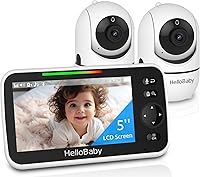
The HelloBaby No WiFi Baby Monitor Camera and Audio HB6550 has a 5 inch color display, 355 degree horizontal and 120 degree vertical rotation, and 2X zoom. It uses a private 2.4GHz FHSS link with no WiFi needed, plus infrared night vision and two-way audio.
The HelloBaby No WiFi Baby Monitor 2 Cameras, model HB6560-2, has a 6 inch split screen IPS display, two plug-in pan and tilt cameras, and battery life rated at 16 to 30 hours. It also uses a private 2.4GHz FHSS link with no WiFi or app needed, and up to 1000 ft range outdoors with the antenna extended.
Test one camera at a time on a two-camera setup. If one camera works and the other does not, the fault is likely in that camera, its adapter, or its pairing.
If neither camera works, focus on the screen, its battery, and its charger. That split saves time and parts money.
When should you replace the monitor instead of fixing it?
Replace the unit when power, pairing, and camera tests all fail, or when parts cost close to a new monitor. Repeated faults are a sign to stop troubleshooting.
Note the exact symptom, when it started, and what you already tried. That list helps support staff and helps you decide if a part or a full replacement makes sense.
An audio-only option can be a useful backup while a video unit is repaired. The VTech Communications DM221 is a dedicated audio monitor with DECT 6.0, up to 1,000 ft range, a 5-level sound indicator, talk-back intercom, and a night light on the baby unit.
The DM221 parent unit runs on a rechargeable Ni-MH battery or AC power, and VTech says to use both at the same time for continuous monitoring. Its sound sensitivity can be set to hear all sounds or only sounds above a set level.
If you want a video upgrade after a failure, compare current models in the best hello baby monitor guide. Check camera count, battery life, and whether the model needs WiFi.
For a different brand option, read our eufy baby monitor e21 review. For a lower cost model, see the eufy baby monitor e20 review.
How do you prevent the same problem from happening again?
Keep the screen charged, the camera plugged in firmly, and the units inside tested range. Simple habits prevent most repeat faults.
Charge the screen before it runs flat and keep the camera adapter in a safe outlet. Avoid sharing that outlet with devices that switch on and off often.
Mount the camera out of baby reach and firm enough that it will not tip. A loose mount can change the view and pull the power cord.
Test the monitor from the rooms where you will use it most. A link that works in the nursery may fail from the kitchen or bedroom, so test before bedtime.
Keep the manual and model number in one place. Model numbers include HB6550 and HB6560-2, and the right steps depend on that number.
Frequently asked questions
Why does my HelloBaby monitor show no signal?
A no signal message usually means the camera and screen are out of range, paired to the wrong channel, or the camera has lost power. Move the screen closer, confirm both units are on, and re-pair them using your model's steps.
Walls, metal doors, and other electronics can also weaken the link.
Why is my HelloBaby monitor screen black?
A black screen can come from a dead battery, a screen in audio-only or power-saving mode, or a camera that is off. Charge the screen, press the power button, and check the camera power light.
Our guide to a hello baby monitor black screen covers the full fix list.
How do I reset a HelloBaby monitor?
Unplug the camera and screen, wait one minute, then plug them in again and allow time to link. If that fails, follow the model's factory reset steps in the manual and pair the units again from close range.
Keep the manual steps for your exact model, since menus differ.
Can a HelloBaby monitor work without WiFi?
Yes, many HelloBaby video monitors use a private 2.4GHz FHSS link and need no WiFi or app. That means router or internet problems should not affect the camera-to-screen link.
If your model is WiFi-based, check the app and network instead.