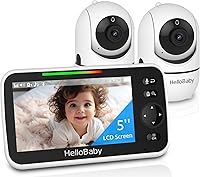
How to Fix a HelloBaby Monitor Black Screen
A HelloBaby monitor black screen usually means low power, VOX or eco mode, a dimmed display, or a lost camera link. Check the charger and battery first, then wake the screen with sound or a button press, and re-pair the camera if audio continues without video.
On this page (9 sections)
- How do I know if low power is causing the black screen?
- What if the screen is in VOX or eco mode?
- How do I fix a black screen caused by display settings?
- How do I re-pair the camera when the screen stays black?
- Why does the screen go black at night?
- How do I check the charger and adapter?
- What is the difference between fixable faults and a dead unit?
- How can I prevent a black screen in the future?
- Should I fix this HelloBaby black screen or buy a new monitor?
A HelloBaby monitor black screen usually means low power, VOX or eco mode, a dimmed display, or a lost camera link. Check the charger and battery first, then wake the screen with sound or a button press, and re-pair the camera if audio continues without video.
You can work through this fix in a few minutes without opening anything. Start with power, because a screen that will not light up on AC power points to the adapter, the outlet, or the battery rather than the camera.
How do I know if low power is causing the black screen?
Charge the parent unit on AC power for at least 30 minutes, then try to wake it. A low battery is the most common cause of a black screen that appears out of nowhere.
Plug the adapter directly into a wall outlet, not a power strip. Confirm the plug is fully seated in the unit and the charging light turns on.
If no light appears, test that outlet with a lamp or phone charger.
Does the camera also need power?
Yes, the camera must be plugged in and switched on. Most cameras run from AC power only, so an unplugged camera can leave you with a dark screen or a no-signal message.
Check that the camera adapter is firm and the camera power light is on. Move the camera closer to the parent unit for a test, because distance and walls can weaken the link.
If the parent unit wakes on AC power but dies within minutes off AC power, the battery is likely worn. That pattern is different from a bad charger, because the screen will light up while plugged in.
What if the screen is in VOX or eco mode?
VOX and eco modes keep the screen dark until sound passes a set level. The link can be fine while the screen stays off.
Speak loudly near the camera or clap and watch the parent unit. A working VOX mode should wake the screen within seconds.
If it wakes, lower sensitivity so smaller sounds trigger it.
Check the menu for VOX, eco, audio only, or saving power mode labels. Turn those modes off for a test, because a high threshold can hide normal baby sounds.
The HelloBaby HB6550 audio only saving power mode extends battery life but can look like a fault. If you are reading hello baby monitor not working cases, sound with no picture points to display settings, while silence with no picture points to power or pairing.
How do I fix a black screen caused by display settings?
Raise the brightness and turn off any screen timeout, then check the contrast. A screen set too dim can appear black in daylight, even when video is running.
Open the display menu and move brightness to the highest step. Look for a separate contrast or screen saver setting, because both can darken the picture.
Change one setting at a time so you know what helped.
Try the monitor in a darker room to separate a truly off screen from a dim one. If the picture appears in the dark, brightness rather than power is the likely cause.
Check that you selected the correct camera channel. A monitor paired to camera 1 will not show camera 2, and vice versa.
Switch channels and give each one a few seconds to connect.
How do I re-pair the camera when the screen stays black?
Place the camera and parent unit side by side, then re-pair them from the menu. A lost link is common after a power outage, a moved camera, or a channel change.
Follow the pairing steps in your manual, usually under a camera, add camera, or pairing option. Keep the units within a few feet during pairing, then test video before you move the camera back.
Turn both units off, wait, then power them on again if pairing stalls. A full restart can clear a stuck connection without changing any settings.
Extra cameras must match your exact model. HelloBaby notes that some updated HB6550 cameras are not compatible with older units, so check compatibility before you swap a camera.
If one camera shows video and the other stays black, the fault is likely in that camera, its adapter, or its position. Swap the cameras between mounts to see whether the problem follows the camera or the outlet.
Why does the screen go black at night?
Night vision, dim lighting, and VOX mode can combine to hide a working feed. The camera may be sending infrared video that looks very dark on a low brightness setting.
Raise brightness after dark and check that night vision is set to auto rather than off. Move your hand in front of the lens, because a working infrared feed should show motion as a lighter shape.
Point the camera at a lit object first, then return it to the nursery. That test tells you whether the link works when infrared is not needed.
Face the camera away from a window or bright lamp. Strong backlight can make the sensor underexpose the room and produce a near black image.
How do I check the charger and adapter?
Test the original adapter first, then try a known good outlet and a fully seated plug. A charger fault can cause a black screen that comes and goes as the plug shifts.
Inspect the cable for kinks, cracks, or a bent prong. Stop using an adapter with exposed wire or a loose prong, because a damaged adapter is a safety issue as well as a function problem.
Try the parent unit on AC power with the battery removed, if your model allows it. If it works without the battery, the battery or its contacts may be the fault.
If the original adapter produces no charging light anywhere, compare it with the best hello baby monitor charger options and buy only a charger that matches your model and voltage. Do not use a random phone charger unless the manual allows it.
An audio only monitor will not solve a video black screen, but it can help you decide whether you still need video. The VTech DM221 has two way talk back and a night light on the baby unit, with up to 1,000 ft of range.
What is the difference between fixable faults and a dead unit?
A fixable fault responds to AC power, a wake up press, or re-pairing. A dead screen stays black across outlets, after a full charge, and with the camera next to the parent unit.
Note what still works. If audio, a charging light, or menu icons appear, the fault is narrower.
If nothing appears, suspect power delivery first.
Try a different outlet on a different circuit, since a tripped breaker or faulty outlet can mimic a dead charger. Test the camera there too.
Reset both units only after you test power, because a reset will not fix a worn battery or failed adapter. It is still worth trying when the screen wakes but the camera will not pair.
Contact the seller or maker if the screen stays black after those tests, and keep your model number handy. If you need a replacement, compare the best HelloBaby monitors by model and features.
HB6550, HB6560, and other models use different pairing steps and accessories.
If you decide to replace the monitor, read our guide on how to choose a baby monitor first.
How can I prevent a black screen in the future?
Charge the parent unit regularly, keep adapters seated, and test the link after any move. Small habits prevent most repeat black screens.
Use VOX sensitivity that matches your room, rather than the highest setting. A setting too high keeps the screen off for normal sounds, while a setting too low may wake it constantly.
Mount the camera where its lens has a clear view and its cable will not be pulled. Confirm the image each time you return it to the nursery, because a bumped mount can turn the lens toward a wall or bed rail.
Pan and tilt can also cause a dark view if the camera faces a corner. Move the camera with the remote and watch for a change, because a working motor can reveal a normal crib view hidden by position.
Check our best hello baby monitor picks if you want to upgrade while you fix the old unit. A newer model may add pan and tilt, a larger screen, or split screen viewing for two rooms.
For travel, test the link before you leave home. See best baby monitor for travel if you plan to use the monitor in hotels or at family homes.
A best split screen baby monitor is worth considering if you watch two rooms and one feed goes dark. Split screen shows whether one camera fails while the other still works, and our eufy baby monitor e20 review helps if you want a different brand.
Should I fix this HelloBaby black screen or buy a new monitor?
Fix it if AC power, a wake up press, or re-pairing brings back video. Those three tests cover most black screen cases without spending anything.
Buy a charger if the screen wakes on a tested adapter but not on the original one. Buy a battery or a camera only when the fault follows that part across outlets and positions.
Replace the whole monitor when the screen stays black on AC power, the battery drains quickly, or the camera will not pair after a reset. At that point, compare the best hello baby monitor and camera sets and choose based on rooms, range, and battery life.
Keep new adapters, batteries, and cameras matched to your exact model. A mismatched camera can create the same black screen you just fixed.
If power and pairing both test fine but the picture stays dark, check brightness, night vision, and camera position before you spend money. That order saves you from replacing a monitor that was only in VOX mode or faced the wrong way.
Frequently asked questions
Why is my HelloBaby monitor screen black?
A black screen most often points to low battery, VOX or eco mode, a screen that timed out, or a camera that lost its link. Check power first, then press a button or make sound near the camera.
If you can hear your baby but see nothing, try lowering brightness settings or re-pairing the camera.
How do I wake a HelloBaby monitor from a black screen?
Press any button on the parent unit, speak or clap near the camera, or plug the unit into AC power. VOX mode wakes the screen only when sound passes your sensitivity setting.
If the screen stays dark, check that the charger is seated and the battery is charged.
Can a bad charger cause a black screen?
Yes. A loose plug, a charger that is not delivering power, or a battery that will not hold a charge can leave the screen dark even when the camera still transmits.
Test with the original adapter on a known outlet, then compare the best hello baby monitor charger options if the original fails.
When should I replace a HelloBaby monitor instead of fixing it?
Replace it when the screen stays black on AC power, the battery drains in minutes, or re-pairing fails after a full reset. If you also want a second room view, compare the best hello baby monitor and camera sets before you buy a single camera.