Can the Infant Optics DXR-8 Pro Show Split Screen?
The standard Infant Optics DXR-8 Pro does not show split screen. It switches between cameras one at a time, while the separate DXR-8 Pro SS model is the version made to show two cameras side by side.
On this page (11 sections)
- Does the Infant Optics DXR-8 Pro show two cameras at once?
- Why does the SS model matter for split screen buyers?
- How does camera switching work in daily use?
- What are the real trade-offs of split screen?
- Which no-Wi-Fi monitors fit parents who want two rooms?
- When is audio-only monitoring the smarter choice?
- Can Wi-Fi cameras work well for split screen viewing?
- How should parents choose between switching and split screen?
- What should you check before you buy the DXR-8 Pro SS?
- Is the Nanit Pro part of this split screen decision?
- What is the final rule for the Infant Optics DXR-8 Pro split screen question?
The standard Infant Optics DXR-8 Pro does not show split screen. It switches between cameras one at a time, while the separate DXR-8 Pro SS model is the version made to show two cameras side by side.
Camera switching, camera count, and split screen are separate choices. Switching shows one room at a time.
Split screen shows two rooms at once. This guide explains how to tell them apart.
Does the Infant Optics DXR-8 Pro show two cameras at once?
No. The standard Infant Optics DXR-8 Pro shows one camera at a time.
You switch the view when you want to check another room.
That design keeps the picture large and easy to read. You get a full view of one crib instead of two smaller tiles.
The trade-off is that while you watch room one, you are not watching room two.
Split screen puts two feeds side by side. Sound may still come from only one side at a time on some systems.
For this model, standard Pro means switching and SS means split screen.
Why does the SS model matter for split screen buyers?
The SS model matters because SS stands for the split screen design. It is a different variant from the standard DXR-8 Pro, not just a new color or an extra camera.
Names can hide that difference. Search results often group related models together, and listings can use similar photos.
Always check the full model name on the box and in the product name.
A guide to how to choose a baby monitor starts with room count, not brand. Two kids in two rooms need a different display than one baby in one nursery.
If you need both rooms in view, make split screen a must-have feature before you compare price.
How does camera switching work in daily use?
Camera switching works by showing one feed, then letting you change to the next feed. It is like rotating your attention between rooms with a button or menu.
That can feel fine during the day. You glance at the nursery, then check the sibling room, then return to the crib.
At night, switching can be slower. You may need to wake fully and wait for the other view to load.
Sound alerts can help, but they do not replace sight. You still need to switch to see what is happening.
For twins or siblings with different sleep patterns, those brief blind spots matter more.
What are the real trade-offs of split screen?
Split screen gives you both rooms in view, but each picture is smaller. That trade-off shapes screen size and how you read movement at night.
On a small parent unit, two tiles can make small details harder to spot. A foot, a pacifier, or a blanket edge may be less clear than on a full screen.
Larger displays help, but they cost more and may be less portable.
Audio is another trade-off. Some systems let you hear one room, some let you hear both, and some focus sound on the room with activity.
Do not assume side-by-side pictures mean side-by-side sound. Check that detail in the exact model you plan to buy.
Which no-Wi-Fi monitors fit parents who want two rooms?
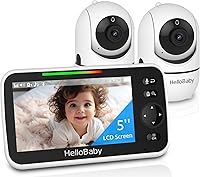
A no-Wi-Fi monitor fits parents who want a private link and no app setup. The HelloBaby No WiFi Baby Monitor 2 Cameras uses a 2.4GHz FHSS private link and shows two rooms with auto or one-tap switching in single view, not split screen.
That distinction is important. This is a two-camera system, but it does not promise side-by-side tiles.
It gives you two rooms on a 5-inch IPS screen by switching between them.
It also supports remote pan, tilt, and zoom, plus up to 4 cameras for expansion. Battery life reaches up to 30 hours in ECO mode.
Room temperature monitoring, night vision, 2-way talk, and 8 lullabies cover daily needs. For a best split screen baby monitor no wifi search, check the view type first, because two cameras do not always mean split screen.
When is audio-only monitoring the smarter choice?
Audio-only monitoring is smarter when sound matters more than sight and simplicity matters most. The VTech Audio Baby Monitor DM111 uses DECT 6.0 digital transmission with no static, no Wi-Fi, and no account.
It has an 8-hour rechargeable battery, a belt clip, and a 1,000 ft range. The 5-level sound indicator lets you mute the speaker and still see how loud the nursery is.
That visual check helps at night when you do not want to wake a partner.
Setup takes about 60 seconds with no app and no pairing screens. AAA batteries are included as backup.
Two-way audio, volume control, out-of-range alerts, and a battery strength indicator cover daily needs.
Audio-only will not show a roll or a blanket. It is best for one room, travel, grandparents, or a secondary monitor.
Our guide to the best baby monitor battery can help you compare portable options.
Can Wi-Fi cameras work well for split screen viewing?
Wi-Fi cameras can work well when you want app viewing, two-way talk, and flexible placement. The Tapo 2K Pan Tilt Security Camera C211 connects over 2.4GHz Wi-Fi and gives 2K high definition video.
It pans 360 degrees horizontally and tilts 114 degrees vertically. That range helps you follow a child across a room or reframe a crib view.
It also works with Alexa and Google Assistant for viewing on a larger screen.
Detection covers motion, person, and baby crying, with instant push notifications. You can save footage on a microSD card up to 512 GB, or use Tapo Care cloud storage.
Two-way audio and night vision round out the night routine.
Wi-Fi adds setup steps a private-link monitor avoids. You need a stable network, an app account, and a plan for outages.
Match the system to how you actually check the nursery at night.
How should parents choose between switching and split screen?
Choose split screen when two rooms must stay visible at the same time. Choose switching when one full view at a time is enough.
Start with your rooms. One baby and occasional checks point to switching or audio-only.
Twins, siblings, or a nursery plus a playroom point to split screen. If you often ask, "Which room is moving?" the answer is split screen.
Next, check screen size and audio. Split screen divides the display, so a larger parent unit is easier to read.
Confirm whether you can hear one room or both.
Then check expansion. Some systems support extra cameras as children grow.
A best baby monitor with two cameras list can help you compare that step, but always confirm the display type for each model.
If a screen goes dark, do not assume the camera failed. Our guide to a hello baby monitor black screen covers checks for power, range, and ECO mode.
What should you check before you buy the DXR-8 Pro SS?
Check the exact model name, the number of cameras, and the display type before you pay. The letters SS are the clue that the Infant Optics model was built for split screen.
Look for DXR-8 Pro SS in the product name, not just DXR-8 Pro. Confirm that two cameras are included if you need two rooms right away.
Some bundles add cameras, and some sell the parent unit alone.
Also check return terms and support. Split screen is a preference, and you may learn you prefer one large view.
A clear return window lets you test the smaller tiles at home. Keep the box until you are sure.
For related models, our best two camera split screen baby monitor guide compares systems built around two cameras and side-by-side viewing. Pair that with our best split screen baby monitor roundup if you want a wider field of options.
Is the Nanit Pro part of this split screen decision?
The Nanit Pro is not part of the Infant Optics split screen choice. It belongs in a different lane, with app-based viewing and a full monitoring system.
A dedicated parent unit with a private link works without Wi-Fi or an app. A system like the Nanit Pro Complete Monitoring System leans on an app and a connected setup.
Those are different daily routines, not just different names.
Our guide to the nanit pro complete baby monitoring system explains what comes with that system. Read it if you want app features.
Skip it if your top priority is a simple two-room view on a parent unit.
What is the final rule for the Infant Optics DXR-8 Pro split screen question?
The final rule is standard Pro for switching, SS for split screen. Do not buy the standard DXR-8 Pro expecting two views at once.
If you want the Infant Optics split screen experience, buy the DXR-8 Pro SS and confirm the camera count in the bundle. If you are happy checking one room at a time, the standard approach can still serve you well.
Pick the display type first, then the brand. That order protects you from a close name and a wrong feature.
Frequently asked questions
Does the Infant Optics DXR-8 Pro have split screen?
No. The standard DXR-8 Pro switches between cameras one at a time.
If you want two camera feeds on the parent unit at once, look for the DXR-8 Pro SS version, which was made for split screen viewing.
Is camera switching the same as split screen?
No. Camera switching shows only one room at a time until you change the view.
Split screen shows two rooms side by side on the same display.
Switching is simpler and cheaper, but split screen gives a fuller view of both rooms.
Can a standard DXR-8 Pro show two rooms at once?
No. A standard DXR-8 Pro can watch one camera at a time.
You can add cameras for more rooms, but you must switch between them.
That means you can miss activity in the other room while you watch one feed.
What should I buy if I need split screen?
Buy a model built for split screen or a system with two cameras that can show both views at once. Check the exact model name, not just the product line.
The letters SS on the Infant Optics DXR-8 Pro SS point to that split screen design.