How to Pair a Motorola Baby Monitor
To pair a Motorola baby monitor, charge the parent unit, plug in the camera, turn both on, and use the pairing or camera-add option on the parent unit until the camera appears. Keep the units close for the first link, then test the feed in the nursery before mounting anything.
On this page (9 sections)
- What do you need before you pair a Motorola baby monitor?
- How do you pair a Motorola baby monitor for the first time?
- How do you add a second Motorola camera to the parent unit?
- Where should you place the camera and parent unit during pairing?
- How do you test the picture, sound, and range after pairing?
- What should you do if the Motorola camera will not pair?
- How do you reset a Motorola baby monitor without losing the camera link?
- Which non-Wi-Fi monitors are good backups if pairing keeps failing?
- How do you keep a paired Motorola monitor working well?
To learn how to pair a Motorola baby monitor, start with the camera and parent unit next to each other, power both correctly, and follow the add-device or pairing prompt on the parent unit. This first link works best at close range, so do not mount the camera until you see a clear live picture.
Pairing is usually simple, but menus differ by model. Some systems link automatically on first power-up.
Others use a camera or add button.
What do you need before you pair a Motorola baby monitor?
You need the camera, the parent unit, both power adapters, and the manual for your exact model before you start. Charge the parent unit first if it is new or unused for a while.
Check the model name on both units. Motorola sells monitors with different screens, camera counts, and menu layouts, so a step from one model may not match yours.
Keep each adapter with its unit so you do not mix them up.
Clear a table in the nursery or a nearby room. Place the camera and parent unit side by side so you can hold the parent unit while you work.
Good light will help you read small buttons and labels.
If you plan to add a second camera later, check support now. Compatibility matters more than brand alone.
Our guide to how to choose a baby monitor can help you decide if an extra camera or a different system fits your home better.
How do you pair a Motorola baby monitor for the first time?
The first pairing usually follows power on, open the add-camera option, wait for the search, and save the camera when it appears. Keep noise low so you can hear any beep or confirmation tone.
Plug the camera into power, then switch on the parent unit beside it. If the screen asks you to set up or add a camera, follow that prompt.
On models with a menu, look for Camera, Add Camera, or Pair.
Press the pairing control on the camera only if the manual asks for it. Some models pair by holding a button for a few seconds.
Others search as soon as the parent unit asks for a new device. Watch for a camera number, signal icon, or live image.
Once the picture appears, test the basics right away. Move the view if it pans or tilts.
Speak near the camera and listen on the parent unit. Check volume, brightness, and night view before you save.
How do you add a second Motorola camera to the parent unit?
You add a second camera by using the same add-camera option and selecting the next open camera slot. This works only if your parent unit supports multiple cameras and the extra camera is compatible.
Start with the first camera already working. Open the menu and choose Add Camera or a similar setting.
Plug in the new camera nearby and follow the search prompt. Save it when it appears and check that you can switch between views.
Walk to each room and confirm the parent unit shows the right picture. Check the manual before you buy, since not every Motorola camera works with every parent unit.
Where should you place the camera and parent unit during pairing?
Place the camera about 3 to 6 feet from the parent unit on a stable surface during pairing. Close range gives the clearest signal while you learn the menus.
Put the camera at roughly the height and angle you plan to use. If it will sit on a dresser or mount, copy that setup on the table.
Keep cords away from the baby area and walkways. Use the adapters that came with each unit.
Hold the parent unit in a normal viewing position. Check that the screen is easy to read and the volume is loud enough to hear a test voice.
If the screen is dim, adjust brightness now. If the image looks dark, check room light and camera angle before assuming a fault.
Pairing at close range makes it easier to hear beeps and press small buttons. Once the link works, move the camera to its final spot and test again from the rooms where you will use the parent unit.
How do you test the picture, sound, and range after pairing?
After pairing, test the live picture in the nursery, then test the parent unit from each room where you will carry it. A good first link does not always mean a good link from the kitchen or bedroom.
Check the crib view first. Make sure the camera sees the sleep space without a blocked corner and stays steady when it pans, tilts, or zooms.
Test sound with a normal voice from the nursery door and from inside the room. Monitors should pick up stirring and crying clearly.
Now carry the parent unit to the bathroom, kitchen, bedroom, and laundry area. Watch for signal loss or dropouts.
Thick walls and large appliances can affect some models. If your home is large, a monitor without Wi-Fi may be worth comparing, and our guide to the best baby monitor no wifi explains the trade-offs between dedicated links, phone apps, and home networks.
What should you do if the Motorola camera will not pair?
If the camera will not pair, move both units closer, charge them fully, and restart the pairing search from the parent unit. Most failures come from power, distance, or the wrong menu path.
Unplug both units, wait a few seconds, then plug them in again in the same room. Open the add-camera option and watch for the search screen.
Press any pairing button only as the manual describes. Some controls also trigger reset functions.
Check that the camera is in pairing mode, not just switched on. A camera linked to another parent unit may not search for a new one.
Use the correct adapter for each unit and make sure each plug is fully seated. If an error code appears, write it down and use our guide to motorola baby monitor troubleshooting for the next checks.
How do you reset a Motorola baby monitor without losing the camera link?
Reset only when restarting, charging, and re-pairing do not solve the problem. A reset can clear the link, so treat it as a repair step rather than a first step.
First, unplug and replug both units. Charge the parent unit until the battery indicator shows full.
Try the add-camera step again at close range, with the camera on a table. This rules out a weak signal from its final position.
If the units still will not link, check the manual for the exact reset method. Some resets use the menu.
Others use a small button or a button press while powering on.
Keep both units plugged in during the reset. Afterward, pair the camera again as if it were new.
Save it when it appears and test picture, sound, and range before remounting. If it still will not link, contact support with the model name and any error message.
Which non-Wi-Fi monitors are good backups if pairing keeps failing?
If Motorola pairing keeps failing, consider a dedicated non-Wi-Fi monitor with a simpler link and no app setup. You give up phone viewing, but setup and privacy are easier for many households.
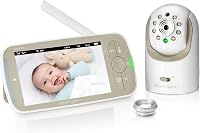
The Infant Optics DXR-8 480p Video Baby Monitor uses a non-WiFi FHSS connection, interchangeable lenses, pan, tilt, zoom, LED sound bar, night vision, and two-way talk. It suits parents who want video without routing it through a phone app.
The VTech Audio Baby Monitor, model DM111, is audio-only with DECT 6.0, no Wi-Fi, an 8-hour battery, a belt clip, 1,000 ft range, and a 5-level sound indicator. It suits grandparents, travel, or a second room where a simple audio link is enough.
The Infant Optics DXR-8 PRO is a 5-inch HD video monitor with one camera, no Wi-Fi, FHSS, pan, tilt, zoom, an interchangeable lens, and Active Noise Reduction. It is a stronger pick for a larger screen and a clearer close-up view.
For a deeper look at one of these options, read our infant optics dxr-8 pro review. For audio-only alternatives, see our vtech dm221 audio baby monitor review.
For portable monitoring, our guide to the best baby monitor battery can help you plan charging. If phone viewing matters more than a dedicated link, compare the momcozy baby monitor bm04 review before you switch systems.
How do you keep a paired Motorola monitor working well?
Keep the paired system working by charging the parent unit on a routine, keeping the camera lens clean, and retesting the link after moves or furniture changes. Small habits prevent most repeat problems.
Charge the parent unit before it runs flat. Keep the charger where you use it most at night.
Wipe the camera lens with a soft, dry cloth when the picture looks hazy. Dust can make night vision and zoom views look worse.
After any move, test the link again. Moving the crib or changing the camera angle can block the view or weaken the signal.
Test the parent unit from bed, not just from the nursery doorway. This matters most at night, when controls need to make sense quickly.
If you need a backup while a parent unit charges, an audio-only unit can cover a second room. Then use the motorola baby monitor troubleshooting guide for model-specific faults and our best baby monitor Motorola guide if you decide to upgrade.
Frequently asked questions
How long does it take to pair a Motorola baby monitor?
Most pairings take a few minutes once both units are charged and plugged in. Keep the camera and parent unit in the same room, follow the on-screen add-camera step, and wait for the live picture to appear.
If it does not link, restart both units and check the power adapters.
Why will my Motorola camera not pair?
The usual causes are low battery, a weak signal, the wrong pairing mode, or trying to add a camera that is not compatible with that parent unit. Move the units closer together, charge them fully, confirm the exact model pairing steps, and reset only if the manual allows it.
Can I pair more than one camera to one Motorola parent unit?
Some Motorola systems support more than one camera, while others do not. Check the manual for your exact parent unit and camera model before you buy an extra camera.
The pairing path is usually the same add-camera option in the parent unit menu.
Should I pair the camera before mounting it?
Yes. Pair and test the picture, sound, pan, zoom, and night view on a table first.
You can confirm the angle and volume before you drill, stick, or place the camera in its final spot, which saves time if the view needs to change.